SQL joins
INNER, LEFT, RIGHT, FULL OUTER, CROSS and self joins in SQL, with two small example tables, the queries and their results.
6 min readUpdated
A join combines rows from two tables into one result, by matching a column in one table with a column in the other. The join type decides what happens to rows that have no match: INNER JOIN drops them, and the outer joins (LEFT, RIGHT, FULL) keep them and fill the missing side with NULL.
This note runs each join type on the same two small tables and shows the result rows.
Example tables
table_a and table_b share the key column id. Keys 1 and 2 exist in both tables, key 3 only in table_a, and key 4 only in table_b:
CREATE TABLE table_a (id INT PRIMARY KEY, val_x VARCHAR(10));CREATE TABLE table_b (id INT PRIMARY KEY, val_y VARCHAR(10));
INSERT INTO table_a VALUES (1, 'X1'), (2, 'X2'), (3, 'X3');INSERT INTO table_b VALUES (1, 'Y1'), (2, 'Y2'), (4, 'Y3');| table_a.id | val_x |
|---|---|
| 1 | X1 |
| 2 | X2 |
| 3 | X3 |
| table_b.id | val_y |
|---|---|
| 1 | Y1 |
| 2 | Y2 |
| 4 | Y3 |
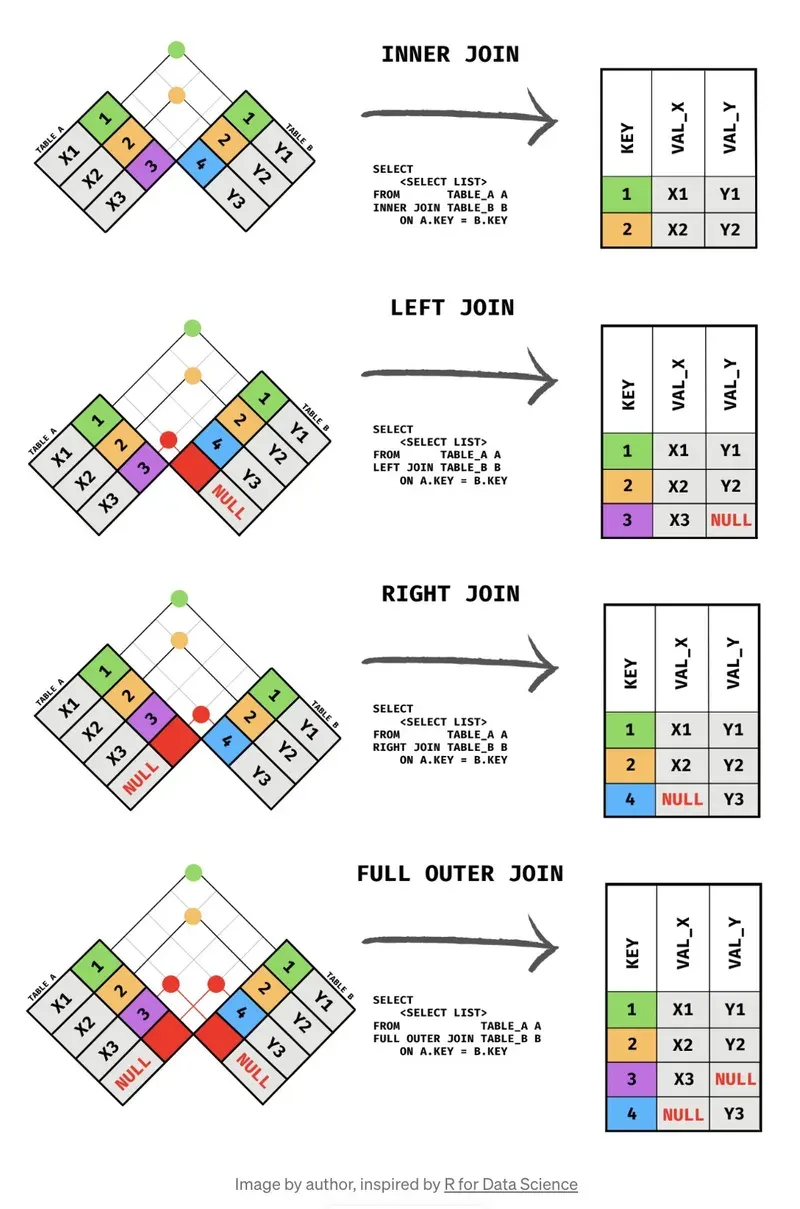
The diagram shows the four main join types on these tables: matching keys meet in the middle, and a key without a partner gets NULL on the other side.
INNER JOIN
Returns only the rows whose key exists in both tables. JOIN on its own means INNER JOIN.
SELECT a.id, a.val_x, b.val_yFROM table_a aINNER JOIN table_b b ON a.id = b.idORDER BY a.id;| id | val_x | val_y |
|---|---|---|
| 1 | X1 | Y1 |
| 2 | X2 | Y2 |
Keys 3 and 4 have no partner, so they are not in the result.
LEFT JOIN
Returns every row of the left table (table_a), with the matching row from the right table where there is one and NULL where there is none. LEFT OUTER JOIN is the same.
SELECT a.id, a.val_x, b.val_yFROM table_a aLEFT JOIN table_b b ON a.id = b.idORDER BY a.id;| id | val_x | val_y |
|---|---|---|
| 1 | X1 | Y1 |
| 2 | X2 | Y2 |
| 3 | X3 | NULL |
A common use is finding rows without a partner: add WHERE b.id IS NULL to get only key 3, the rows of table_a that have no match in table_b.
RIGHT JOIN
The mirror image of LEFT JOIN: every row of the right table (table_b), with NULL where the left table has no match. Select the key from b, because a.id is NULL for key 4.
SELECT b.id, a.val_x, b.val_yFROM table_a aRIGHT JOIN table_b b ON a.id = b.idORDER BY b.id;| id | val_x | val_y |
|---|---|---|
| 1 | X1 | Y1 |
| 2 | X2 | Y2 |
| 4 | NULL | Y3 |
Any RIGHT JOIN can be written as a LEFT JOIN by swapping the tables, which most people find easier to read.
FULL OUTER JOIN
Returns every row from both tables: matched rows side by side, and unmatched rows from either table with NULL on the other side. COALESCE picks the key from whichever table has it.
SELECT COALESCE(a.id, b.id) AS id, a.val_x, b.val_yFROM table_a aFULL OUTER JOIN table_b b ON a.id = b.idORDER BY id;| id | val_x | val_y |
|---|---|---|
| 1 | X1 | Y1 |
| 2 | X2 | Y2 |
| 3 | X3 | NULL |
| 4 | NULL | Y3 |
Emulate FULL OUTER JOIN in MySQL
MySQL (and MariaDB) do not support FULL OUTER JOIN. Combine a LEFT JOIN and a RIGHT JOIN with UNION:
SELECT a.id, a.val_x, b.val_yFROM table_a aLEFT JOIN table_b b ON a.id = b.idUNIONSELECT b.id, a.val_x, b.val_yFROM table_a aRIGHT JOIN table_b b ON a.id = b.idORDER BY id;The matched rows (keys 1 and 2) come out of both halves, and UNION removes the duplicates. The result is the same four rows as above.
UNION also removes rows that are genuinely identical in the data, which a real FULL OUTER JOIN would keep. To avoid that, use UNION ALL and keep only the unmatched rows in the second half:
SELECT a.id, a.val_x, b.val_yFROM table_a aLEFT JOIN table_b b ON a.id = b.idUNION ALLSELECT b.id, a.val_x, b.val_yFROM table_a aRIGHT JOIN table_b b ON a.id = b.idWHERE a.id IS NULLORDER BY id;CROSS JOIN
Returns every combination of a row from the first table with a row from the second, without any join condition: the Cartesian product. Two tables of 3 rows give 3 × 3 = 9 rows.
SELECT a.val_x, b.val_yFROM table_a aCROSS JOIN table_b bORDER BY a.val_x, b.val_y;| val_x | val_y |
|---|---|
| X1 | Y1 |
| X1 | Y2 |
| X1 | Y3 |
| X2 | Y1 |
| X2 | Y2 |
| X2 | Y3 |
| X3 | Y1 |
| X3 | Y2 |
| X3 | Y3 |
It is useful for generating combinations, such as every size with every colour. A forgotten join condition produces the same explosion of rows by accident.
Self join
A self join joins a table with itself, using two different aliases. It is how you follow a reference to another row of the same table, such as an employee’s manager:
CREATE TABLE employee (id INT PRIMARY KEY, name VARCHAR(20), manager_id INT);INSERT INTO employee VALUES (1, 'Alice', NULL), (2, 'Bob', 1), (3, 'Carol', 1);
SELECT e.name AS employee, m.name AS managerFROM employee eLEFT JOIN employee m ON e.manager_id = m.idORDER BY e.id;| employee | manager |
|---|---|
| Alice | NULL |
| Bob | Alice |
| Carol | Alice |
The LEFT JOIN keeps Alice, who has no manager; an INNER JOIN would drop her.
Conditions in ON and WHERE
In an outer join, where a condition goes changes the result. A condition in ON decides which rows match; rows of the preserved table are kept either way. A condition in WHERE filters the joined result, and a test on a column of the outer side removes the NULL rows, which turns the outer join into an inner join:
-- keeps key 3, with val_y = NULL: the condition only restricts the matchSELECT a.id, a.val_x, b.val_yFROM table_a aLEFT JOIN table_b b ON a.id = b.id AND b.val_y <> 'Y2';
-- drops key 3: NULL <> 'Y2' is not true, so the WHERE filters the row outSELECT a.id, a.val_x, b.val_yFROM table_a aLEFT JOIN table_b b ON a.id = b.idWHERE b.val_y <> 'Y2';
The first query returns keys 1, 2 and 3 (key 2 with NULL for val_y); the second returns only key 1.